Zomalex | Data and AI Training
Generative AI For Data Analysis Course Outline
Who should attend
This course is primarily for people in data analysis or business intelligence roles.
The course assumes that attendees have experience with data analysis, and so are familiar with the challenges and can recognise the value when AI tools can assist in data analysis tasks. The course is not about teaching data analysis, but about how to use AI tools to help with data analysis.
Learning Objectives
Attendees will learn how to use generative AI assistants to help
- analyse data and visualise data
- to help with the effective use of data analysis tools such as Excel and Power BI , and to write or understand languages that analyse and handle data: in particular SQL and Python
Course Content
The course explains how AI assistants are very useful typical data analysis tasks: for example, solving Excel problems, analysing data, and coding. There are several exercises to use AI assistants to help analyse a dataset. There are sections on:
- Use Gen AI (directly) to help analyse data
- use AI assistants specialised for data analysis e.g. M365 Copilot’s Analyst, Chat GPT’s Data Analyst
- using Copilot and Claude add-ins within Excel to work better with Excel and solve Excel challenges
- write good clear understandable SQL scripts
- write Python (the de-facto open-source language for data science and AI)
- write code in DAX (the data modelling language of Power BI)
- write code in M (the language of Power Query)
- use the Power BI Modeling MCP server to directly improve a semantic model
The agenda is:
- discussion of learning objectives and attendees particular interests and background
- choice of the datasets that we will use in the exercises
- set up of AI tools and software for the exercises
- introduction to the use of AI assistants for data analysis
- some short initial tutorials to get started with using AI assistants for data analysis
- hands-on exercises using real-world datasets
Course Length
This is a full day course.
Pre-requisites
Completion of the Introduction to Generative AI course.
Course Style
The course has both tutorials and group exercises. In tutorials, attendees follow the instructor step by step or prompt-by-prompt. In the group exercises, attendees work in groups of about 4 - 5 people in breakout rooms for about 25-30 minutes. Once back in the main room, a spokesperson for each group summarises their conclusions to the class.
Snapshots from the course exercises
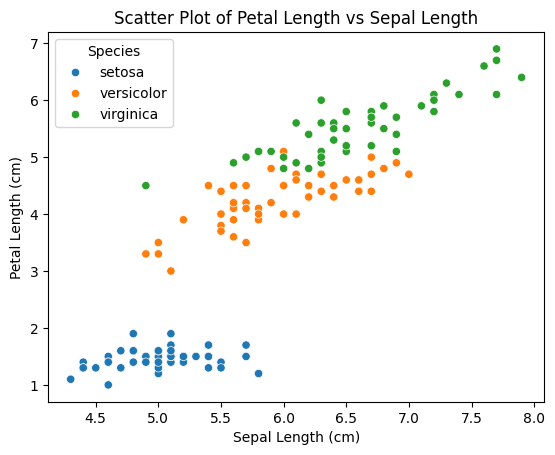
Scatter plot created by a generative AI assistant