Zomalex | Data and AI Training
Use Copilot in Excel Effectively Course
You will learn how to use Copilot within Excel to help with common Excel challenges. You will also learn about Copilot’s capabilities, including its three modes, model choice, skills and rules, and how to use them effectively.
Who Should Attend
Excel users, especially those in finance, who now have a Copilot Premium licence. The case studies and lab exercises in the course are based on finance use cases. Non-finance users may also benefit from the course, since the principles covered apply to a wide variety of Excel tasks.
Learning Objectives
By the end of this course, attendees will be able to use Copilot to solve Excel challenges, working smarter rather than harder.
Course Content
The course will cover how Copilot can help with several typical Excel challenges, for example:
- perform an Excel task quickly and correctly, e.g. write a formula or build a pivot table;
- explain in plain English the formulas and functions in a spreadsheet (one you may have inherited, for example);
- write several Excel formulas to build useful calculations and automate tasks;
- explain why a cell contains an error value, e.g. #N/A, #NAME? or #NULL!, and fix the formula or problem that caused it.
It will also cover Copilot’s capabilities and how to use them effectively:
- the three modes of Copilot: chat, plan and edit;
- choosing the right model for the task: Auto, ChatGPT or Claude;
- Copilot skills: review the built-in skills and build your own custom skills;
- Copilot rules: create a .Rules sheet that gives Copilot guidelines on the spreadsheet’s structure and style.
The course will also cover how Copilot can help you build a financial model from scratch:
- build a financial model from a specification written in plain English;
- review an Excel model for best practice and improve the structure and readability of the spreadsheet.
Course Length
This is a full-day course.
Pre-requisites
It is useful to have a basic familiarity with Excel, for example by attending our Excel Foundation Course.
Snapshot from the course exercises
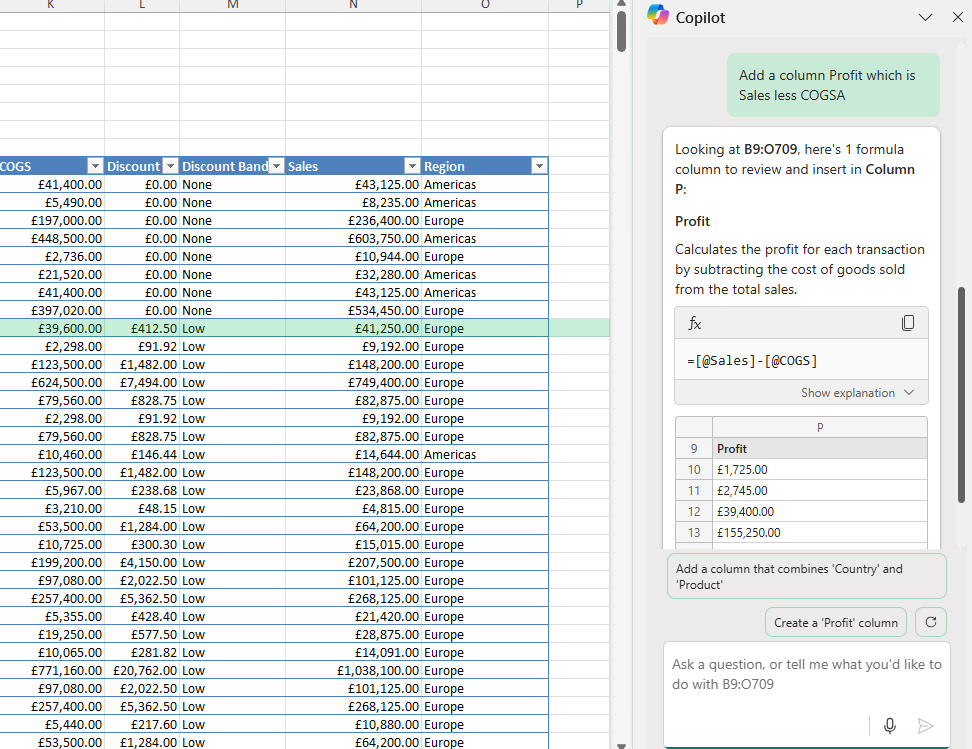
Copilot integrated within Excel