Zomalex | Data and AI Training
Exercise - Advanced Tasks - Thinkers
Thinkers use the powerful reasoning, or chain of thought, versions of the AI assistant to attempt more challenging and larger tasks. As AI assistants have become more powerful, they have shown emergent abilities: the ability to crack jokes, provide step-by-step instructions, perform chain of thought reasoning, act in a role, write poetry, solve university exam questions, do complex maths and algebra, and even reason about the physical world!
It is worth reading the section on researcher capabilities before starting the exercise.
Here are some example prompts to get you started.
University level exam questions
Details on a separate page: GenAI Advanced Exercise - Thinkers - Entrance Exam
Management Consultancy Style Research Project
Details on a separate page: GenAI Advanced Exercise - Thinkers - Research Task
Spatial reasoning
This example demonstrates that AI tools can answer spatial reasoning problems.
There are three blocks, red, yellow and green. Red is at the bottom, yellow is placed on top of red and then green is placed on top of yellow. I now place a new blue block on top of green. What is the order of the blocks from top to bottom?
I now remove the yellow block from its position and place it on the top of the pile. What is the new order?
Maths and algebra
The response to this prompt may suggest that the AI assistant can do some basic maths and algebra, and can explain the step-by-step chain of reasoning that it went through to obtain the answer.
If 3x + 4 = 19, what is x? Explain your reasoning.
Let S ={3,100,{4,200}}. List all elements of S. List all subsets of S.
Once the AI assistant has explained its reasoning, you may want to ask it to simplify further.
Adopt a personality
How well does the AI assistant capture the expressions of the language to suggest an emotional state? In these example, for effect, we exaggerate the personality to see how well it can mimic a particular style of speech. In reality, we would want to use a more subtle tone - professional yet friendly, or empathetic and reassuring. Please feel free to change and adapt the prompt.
Ask the AI assistant to speak to you in the style of a Generation Z person (born between 1996 and 2010), or in the style of King Charles.
Provide an initial prompt to suggest the tone of the AI assistant’s response, for example:
Act as a morose, unhappy, pessimistic, and sarcastic football expert and answer the following questions I will give you.
Then ask some specific questions, (a new prompt for each question) for example:
How did you enjoy the latest Chelsea match?
Who is likely to win the Manchester derby?
Assess how well the AI assistant copes with languages other than English
AI assistants have been trained on data from the internet where English is the most popular language. Therefore we may suspect that it will not perform as well with documents and prompts that are in other languages.
The St Georges NHS hospital pain management toolkit in several languages is available in several languages. Download these in French, or German Or download from the St George’s page.
Provide one of these documents to the AI assistant as an attachment and ask some questions in whatever language that you choose. Does the AI assistant respond as well in other languages as it does in English?
Some AI assistants have voice mode: you can speak, rather than type, the prompt and the AI will speak back in its response. You can have a natural conversation; for example, you can interrupt the AI tool’s response mid-flow.
Write a poem
The next prompt asks the AI assistant to write a poem. Discuss how well it uses the nuances of language, e.g. simile and metaphor and how well it adheres to a poem’s pattern of rhyming and meter?
Write a poem, in rhyming couplets, about the joys of add whatever your job is here.
You can take this further and ask it to write in the style of a famous poet such as John Agard or John Masefield.
You can ask the AI assistant to write the poem in different styles: in iambic pentameter or as a limerick.
You can also ask the AI assistant to translate the poem into another language, then ask it to read the poem aloud to see how well it manages the pronunciation.
Reason about the physical world
The response to this prompt may suggest that the AI assistant has “learned” something about the real world. Don’t forget to create an image and attach it to your prompt
Draw a sketch of a ball connected by string to the ceiling, take a photo and upload it to your PC. Or use this image download
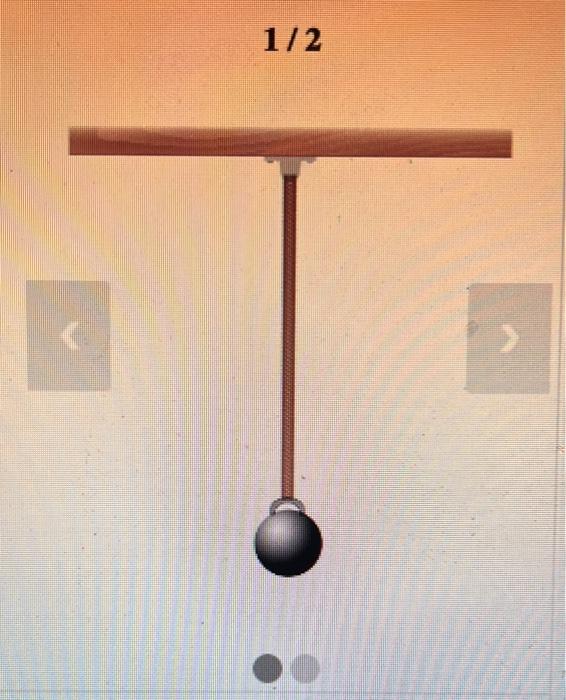

then attach it in a prompt to the AI assistant such as:
Here is a picture (of a ball connected by string to the ceiling). What happens if we cut the string?
If we push the ball to one side and let it go, what will happen?