Zomalex | Data and AI Training
Power BI DAX Course Outline
Who should attend
DAX is the calculation language of Power BI and is the key to building a powerful analysis. A good knowledge of DAX is essential for Power BI experts. This course is for data analysts who use Power BI regularly in their work and need to use DAX well.
Course Length
1 day (short version) or 2 days (preferred, full version)
Learning Objectives
Attendees will be more practised and confident in using DAX, be able to recognise when and where and how to use several common DAX patterns such as time-intelligence and parameter tables and be more familiar with the most common DAX functions.
Pre-requisites
Familiarity with Power BI and with data modelling in Power BI for example by attending the data modelling course.
Course Content
The course will cover the following topics.
The basics of DAX
- An overview of DAX: language and concepts
- the new DAX Query View, which makes learning and writing DAX more of a pleasure.
- DAX Calculated Columns, Measures, Tables.
- Implicit and Explicit measures. Why create explicit measures
- Aggregator Functions e.g. SUM() vs Iterator functions e.g. SUMX
- Common DAX functions
- Variables. The VAR RETURN Syntax. Using several variables. Typical use cases and several examples.
The fundamental importance of context in DAX
- The CALCULATE and CALCULATETABLE functions and why they are so important
- Row context in calculated columns.
- Implicit filter context in measures.
- Context transition
Common DAX Patterns
These include:
- time-intelligence patterns such as year-to-date, moving average, running totals, same period last year etc
- percentage of parent and percentage of total
Advanced Powerful DAX techniques
These include two aspects of the language that considerably reduce the amount of DAX code we need to write:
- DAX User Defined Functions allow us to write reusable building blocks of DAX.
- Calculation Groups allow us to write a single DAX expression that can be applied to several measures .
Optional topics
If time allows, the course may include other topics:
- Parameter Table techniques
- Summarising data with table functions. The SUMMARIZE, SUMMARIZECOLUMNS and GROUPBY functions. Examples use cases e.g. double aggregations: max of sum, netting calculations. SELECTCOLUMNS and ADDCOLUMNS
- Joining and generating data. Using CROSSJOIN for cartesian results. Using GENERATE with FILTER to achieve join outside of the standard relationships.
Example Lab Exercise
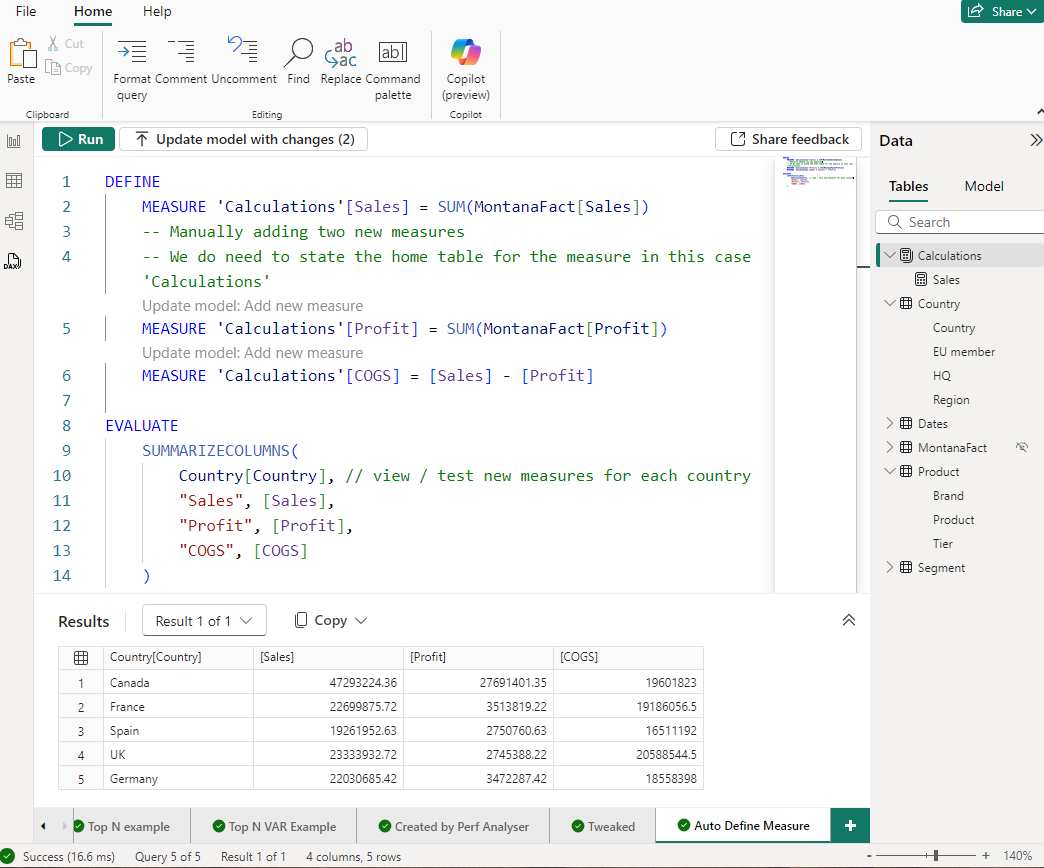
By the end of the course, you will have written some DAX measures similar to those in the screenshot below.