Zomalex | Data and AI Training
Advanced Excel Course
Who should attend
People who want to take their Excel skills to an advanced level, especially to use formulas to automate tasks, and take advantage of spill functions and dynamic arrays to write cleaner, more efficient formulas.
Learning Objectives
By the end of the course, attendees will be able to
- build cleaner, more efficient formulas using dynamic arrays and spill functions
- simplify formulas to clean text and reshape data using modern Excel functions
- reduce the number of time that they have to copy / paste a formula dramatically
- automate an Excel-based process
- use AI to solve Excel challenges
- Excel techniques for building robust spreadsheets including
- the use of flexible and versatile functions such as INDEX, XMATCH, FILTER, LET and LAMBDA
- techniques using dynamic arrays, tables, and named cells
- data validation and conditional formatting
Course Content
Practice using formulas to solve common problems
Attendees solve typical Excel challenges to consolidate their knowledge of how to apply functions such as XLOOKUP, IFS, SWITCH in practical situations.
Dynamic Arrays (the conceptual framework)
Dynamic Arrays underpin many of the new capabilities. We start with a brief look at the essentials: for example, even ordinary old-school functions now work with arrays and produce multiple results rather than a single value under the right conditions. Dynamic arrays allow us often to write simpler formulas, for example, to avoid mixed references in “grid” formulas
Spill functions (the practical applications)
Spill functions return not just a single result in the cell where the formula is written but the results spill over into surrounding cells. We start with a few examples of spill functions, UNIQUE(), SORT() and TRANSPOSE() then focus on a very useful spill function FILTER(). This can filter a table or range and return a set of rows.
We look at several practical examples and uses of spill functions, for example
- clean and split text with the TEXTBEFORE, TEXTAFTER, TEXTJOIN and TEXTSPLIT functions
- stack data with the VSTACK and HSTACK functions
- finding duplicates and counting their occurrences
- easier ways of doing a set of calculations that result in a grid (array) of values
Case Studies
Lab exercises and case studies will consolidate the lessons. For example, one case study is an exercise to find the net present value (NPV) of a project over a number of years taking inflation into account. Another covers how (and why) to use the INDEX / XMATCH pattern to find data in a table.
Optional sections
If time allows and there is interest:
- Data tables – how to create them, why they are very useful especially in financial models.
- Excel’s goal seek technique - and how to apply it
- Use Microsoft Copilot and other generative AI to solve Excel challenges.
- Understand the LET function. This allows us to use variables in formulas. This can make formulas simpler and improve the readability and performance. We’ll look at how LET works and show practical uses.
- Understand the LAMBDA function. This allows us to define and reuse custom functions. We can create both named and anonymous LAMBDA functions (where we define a function then immediately use it). We’ll look at how LAMBDA works and show practical uses.
Course Length
1 day (short version) or 2 days (preferred, full version)
Pre-requisites
Completion of the Excel foundation and intermediate courses.
Snapshots from the course exercises
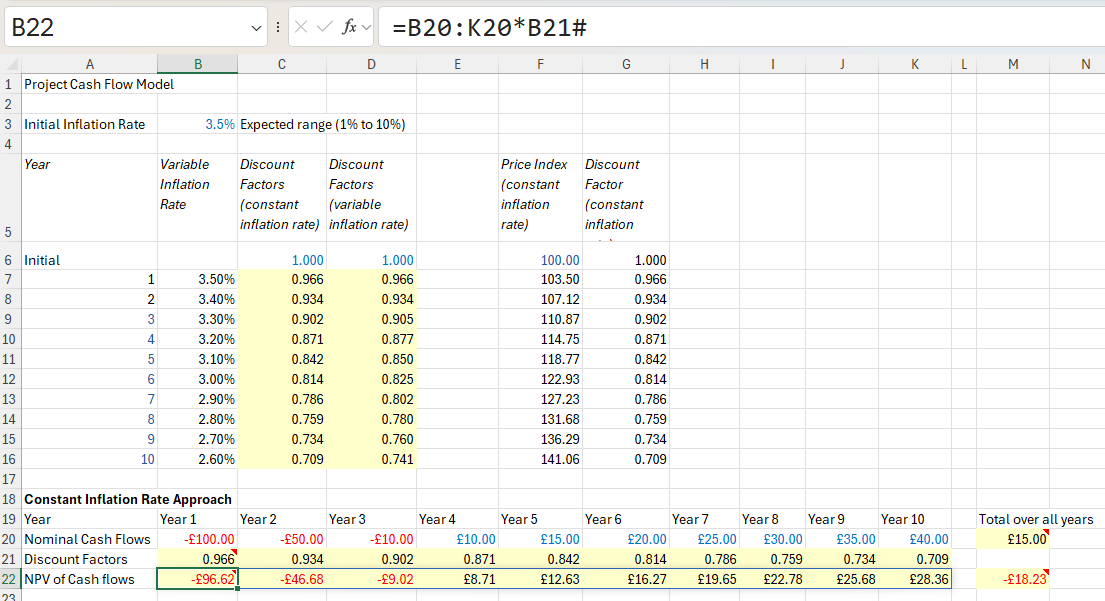
Cash flow model in Excel